
Texas Brains is a creative design and digital growth agency built for founders who don’t want just a logo” or just a website they want a brand that scales, converts, and dominates attention.

The best AI chatbot depends on the task. General tools like ChatGPT, Claude and Gemini suit writing, research and brainstorming. Dedicated chatbot platforms suit customer support and lead capture. A custom chatbot suits businesses that need CRM, calendar, and workflow integration. Compare cost, privacy, integrations, and ease of use before you commit. Anyone who names one best AI chatbot for every small business is selling something. Match the tool to the job.
The best AI chatbot for small business tasks is the one that matches your main job. ChatGPT fits broad everyday work. Claude fits long documents and careful writing. Gemini fits teams that live in Google Workspace. For customer chats on your website, a connected or custom chatbot usually works better than any of them alone. Picking one feels hard because every tool claims to do it all. It doesn’t. So start with the task, not the brand.
We compare tools by cost, integrations, privacy, and ease of use. We don’t crown a winner because your needs decide that. Tools change fast. Test with your real tasks before paying.
Tool | Best for | Team price (approx.) | Watch out for |
|---|---|---|---|
ChatGPT Business | All-purpose writing, research, ideas | $20–$25/user/month | Easy to overshare data |
Claude Team | Long documents, editing, careful analysis | $25–$30/user/month | Fewer built-in app connections |
Gemini for Workspace | Gmail, Docs, Sheets, Meet | Varies by Workspace plan | Weaker if you don’t use Google |
Custom AI chatbot | Support, leads, bookings on your site | Project-based | Needs a real build and upkeep |
Not sure about the price? Many owners start with a free tier, test for a few weeks, then upgrade only if they hit limits.
For customer chats, pick a chatbot that connects to your website, calendar, and CRM. A general chatbot can draft replies. It can’t greet a visitor at 11 p.m., ask qualifying questions, and book a call on its own.
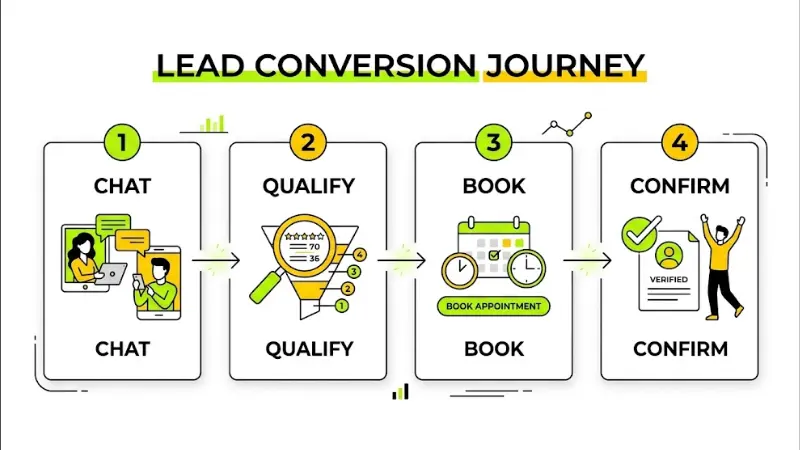
A simple workflow looks like this:
If you run a service business in Seattle, Tacoma, or Spokane, this means fewer missed leads after hours. For ideas on tools, see this Salesforce guide to AI chatbots for small business services. A simple workflow looks like this:
For marketing, Claude and ChatGPT both do well. Use them for drafts, email ideas, and outlines. Then add your own voice and facts. Google rewards helpful, people-first content, so never publish raw AI text.
Losing leads after hours? Texas Brains can map your qualification questions, set your lead rules, and show you where a chatbot will save the most time. Start with a clear plan.
All three are strong general assistants. Each has different features, plans and limits. Compare them on the same tasks instead of trusting one ranking.
Pricing and features change often. ChatGPT subscriptions and API usage are separate products with different billing. Verify current details before you decide.
Often yes, if you use it daily. Paid plans usually offer higher limits and more features. A free plan may be enough for light, occasional use. Test first. Paying does not guarantee better answers.
Feature | General AI assistant | Dedicated business chatbot |
|---|---|---|
Built for | Personal and team productivity | Customer-facing conversations |
Website widget | No | Yes |
CRM and calendar links | Limited | Common |
Setup effort | Low | Medium |
Best use | Writing, research, ideas | Support, lead capture, booking |
Can ChatGPT handle customer inquiries and generate leads on its own? Not by itself on your website. You need a chatbot platform or custom build that connects it to your site, CRM and rules.
Need an AI chatbot tailored to your business? Texas Brains designs custom chatbots with CRM integration, lead qualification, and automated customer replies. Start with a plan for your workflow.
I will not quote exact prices, because plans and project costs change. Compare these cost types:
Is a subscription cheaper than custom? Usually at the start, yes. Custom may fit better when your workflow is complex or you outgrow templates. Ask for a written scope.
Many businesses combine them. Start with one clear task.
Ready to connect your chatbot to your business systems? Texas Brains builds integrations for lead qualification, support, appointment booking, and CRM workflows. Please tell us your process, and we will map the connections.
Check portfolios, security practices and case studies. Compare written proposals, not just prices. If you hire help, ask:
Set a baseline first. Compare after 30 to 90 days.
AI search tools favor clear, trusted pages. Answer common questions directly, keep business details consistent, and use schema where it fits. No one can guarantee an AI recommendation.
Traffic may look flat while leads grow. People often hear your name from AI, then search for you directly.
No single AI chatbot is best. Pick the right tool for each task, protect your data, and measure results. Start small and expand. If you want a plan built around your workflow, Texas Brains can help.
Discuss your workflow, budget and integrations with Texas Brains
Contact us now at +14696706767 or texasbrainsllc@gmail.com and start your project with confidence.
This article is for information only. AI tools, features and prices change often. Verify current details with each vendor and seek advice for privacy and compliance needs.
We help you grow your personal brand with a clear strategy, smart SEO, and marketing that brings real people, not just traffic.
It can be, if you use it for writing, research and planning. Test the free version first. Upgrade if you hit limits or need more features. Avoid sharing sensitive customer data.
Often yes. No-code platforms let you build simple chatbots. Complex integrations and strict security needs may require a developer.
Avoid sensitive customer data, passwords, financial details and confidential contracts, unless your tool and plan are approved for it. Review your provider’s privacy controls.
No. Paid plans may offer more features and higher limits, but accuracy still varies. Review outputs and verify important facts.
List your top task, tools and data. Define success. Then compare ready-made options with custom development and request a written scope.
We will reply to you as soon as possible
Please enter your details, location, and select a suitable date and time slot.