
Blogs
Texas Brains is a creative design and digital growth agency built for founders who don’t want just a logo” or just a website they want a brand that scales, converts, and dominates attention.

How to Connect Your Website, CRM, and AI Tools: A Complete Business Guide for 2026-2027
Table of Contents
Summary
- Why connecting these tools pays off
- A simple 7-step plan
- Native vs. no-code vs. custom: how to choose
- Security, costs, and what to measure
- How clear content also helps AI search
To connect your website, CRM, and AI tools, send form data to your CRM, add AI for lead qualification, then trigger follow-ups and team alerts. Use a native integration if one exists. Use no-code tools like Zapier or Make for gaps. Choose custom API work only when you need control. A new website, a CRM, and an AI chatbot that do not talk to each other are three expensive islands. The value is in the connections.
Why Connect Your Website, CRM, and AI Tools?
A lead fills out a form. Someone copies it into a CRM. Someone else writes an email two days later. By then, the buyer has talked to your competitor. Connected tools remove that gap.
Benefits
- Faster replies to new leads
- Less manual data entry
- Cleaner, more complete contact records
- Better lead scoring and sorting
- Clear reports across sales and marketing
A Simple Example
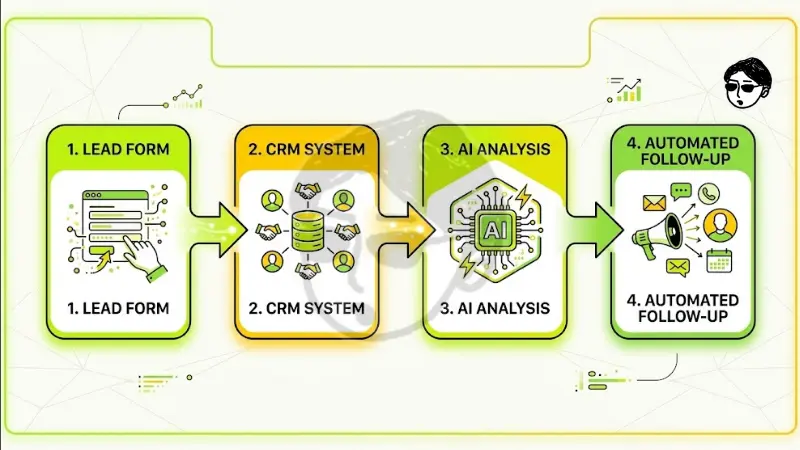
Website form submitted → CRM contact created → AI qualifies the lead → personalized follow-up sent → sales team alerted. Each step happens in minutes, not days.
Will It Increase Sales?
It can help. Faster response and better follow-up often improve results. But no tool guarantees sales. Test, measure and adjust.
How to Connect Your Website, CRM, and AI Tools Step by Step
- List the process you want to automate. Start with one, like new lead handling.
- Connect website forms to your CRM. Use native form tools, a plugin or an automation platform.
- Add AI to your website. A chatbot or smart form can ask questions and capture details.
- Connect AI to your CRM. Pass chat and form data into the right contact fields.
- Automate qualification and follow-up. Score leads, send replies and assign owners.
- Link other business apps. Calendars, email and accounting tools.
- Test, monitor and improve. Check for errors, duplicates and slow steps.
Do not automate everything on day one. One working workflow beats ten broken ones.
Not sure which workflow to connect first? Texas Brains can map your lead path from website to CRM and show where automation saves the most time. Start with a clear plan.
How Do You Integrate AI Into a CRM?
Most integrations work through the CRM’s connectors or APIs. Permissions, available features, and the AI tool’s limits decide what is possible.
Common AI Tasks In a CRM
- Lead scoring: rank leads by fit and interest
- Data entry: fill and update contact fields
- Chatbot handoff: send chat details to the right record
- Follow-up drafts: write replies for review
- Insights: spot patterns in deals and customers
Can AI update records and trigger workflows on its own? Yes, with the right setup. Keep a human review step for important actions.
How Do You Integrate AI With Your Website?
- Add an AI chatbot for support and lead capture
- Connect forms to AI-based qualification
- Send every lead straight to your CRM
- Automate booking and follow-ups
- Personalize content only where it helps the visitor
This works on WordPress, Shopify, or a custom site. Your platform decides the exact method.
Connect AI to Your CRM Without Coding
Yes, you can. No-code tools make it possible.
Your Three Options
Native integration | Often lowest | Low | Limited to what the CRM offers | Low |
No-code (Zapier, Make) | Low to medium | Low to medium | Good for most workflows | Medium: watch for broken steps |
Custom API development | Highest | High | Highest | Higher: needs developer support |
When to choose which
- Use native when your CRM already connects to your tools.
- Use no-code to fill gaps, test ideas and move fast.
- Use custom when you need complex logic, scale or strict control.
If your CRM lacks a direct AI connector, use a no-code bridge or a custom API. GoHighLevel, HubSpot and Salesforce all offer ways to connect outside tools. Check current features before you commit.
What Are the Best CRM Tools for AI Integration?
There is no single best CRM. Pick the one that fits your team and tools.
- HubSpot: user-friendly, popular with growing teams
- Salesforce: powerful and highly customizable, often suited to larger needs
- GoHighLevel: popular with agencies and local service businesses
- Open APIs and solid connectors
- Workflow automation
- Custom fields and permissions
- Reporting you will actually use
- Support and clear documentation
Stuck choosing between HubSpot, Salesforce, and GoHighLevel? Texas Brains can compare them against your workflow, budget, and team, then recommend one with clear reasons
How Much Does Integration Cost?
I will not quote a price because it depends on your setup. Ask for a written scope. No-code is often cheaper to start. Custom work can pay off for complex needs. Watch ongoing costs, not just setup. These factors change the cost:
- Number of tools and workflows
- CRM plan and AI tool fees
- Native, no-code, or custom approach
- Data cleanup needs
- Ongoing monitoring and support
Keep It Secure and Reliable
- Give each tool only the access it needs
- Check where customer data is stored and processed
- Set rules to stop duplicate leads
- Monitor for failed automations
- Keep humans in the loop for key decisions
If you handle sensitive data, review privacy and compliance needs before launch.
How to Measure Results
- Lead response time
- Lead-to-meeting and meeting-to-sale rates
- Hours of manual work reduced
- Data accuracy
- Cost per qualified lead
Baseline these before you start. Then compare. Use your own numbers, and label any example as illustrative.
How AEO and GEO Connect to Your Website
AEO means Answer Engine Optimization. GEO means Generative Engine Optimization. Both depend on clear, well-structured content that machines can understand. Connecting your CRM does not rank you in AI search. But a clear site with consistent business information helps both people and machines.
- Lead sections with direct answers
- Use schema for FAQs and organization details
- Keep your service pages crawlable
- Show real authors and trust signals
Want a partner who explains the plan before building it? Texas Brains maps your goals, tools, and risks first, then builds automations your team can actually use. Let’s talk about your workflow. Book My Strategy Call.
Traffic may look flat while leads grow. People often hear your name from AI, then search for you directly.
Conclusion
Connect one workflow, prove it works, then expand. Faster follow-up, cleaner data, and clearer reporting follow when your website, CRM, and AI tools work as one system. If you want help building it, Texas Brains can plan and implement it with you.
Book your AI integration consultation with Texas Brains
Contact us now at +14696706767 or texasbrainsllc@gmail.com and start your project with confidence.
Disclaimer
This article is for information only. Software features, integrations and prices change often. Confirm details with each vendor and seek legal or compliance advice for data privacy needs.
References
faq’s
Your question answered
We help you grow your personal brand with a clear strategy, smart SEO, and marketing that brings real people, not just traffic.
Let’s exchange ideas
Worth a quick conversation
Build it properly
01
Can I connect my website, CRM and AI tools without a developer?
Often yes. Native integrations and no-code tools like Zapier or Make handle many workflows. You may need a developer for custom logic, unusual systems, or strict security needs.
02
What is the first task I should automate?
Start with new lead handling. Send form entries to your CRM, notify your team and send a quick reply. It is simple, measurable and directly tied to revenue.
03
What CRM and website platform should I use?
Choose based on your team size, budget and tools. Check for strong APIs, connectors and automation features. Test with one workflow before moving everything.
04
How long does integration take?
Simple workflows can go live in days or weeks. Complex, multi-tool systems take longer. Ask for a timeline with milestones and a testing plan.
05
Is no-code cheaper than custom development?
Usually at the start, yes. Custom work costs more upfront but may fit complex or high-volume needs better. Compare setup cost and long-term maintenance.