
Texas Brains is a creative design and digital growth agency built for founders who don’t want just a logo” or just a website they want a brand that scales, converts, and dominates attention.

A custom AI CRM dashboard pulls data from your CRM, website, and tools into one screen. It tracks leads, sales, and customers, then uses AI to spot trends and forecast results. Cost depends on features, integrations, security, and support. It makes sense when off-the-shelf reports no longer fit how your team works. If your team still builds sales reports by hand, you do not have a data problem. You have a dashboard problem.
It is a live screen that turns CRM data into clear charts, alerts, and forecasts. AI helps spot patterns, summarize results, and flag risks.
Feature | Traditional dashboard | AI-powered dashboard |
|---|---|---|
Reports | Fixed charts | Charts plus insights and summaries |
Forecasting | Manual or basic | Trend-based predictions |
Lead sorting | Manual | Automated scoring |
Updates | Often manual | Automatic |
Partly. AI tools can generate dashboard layouts and basic reports from your data. No-code builders can help with simple needs. The limits show up fast. Security, complex integrations, data cleanup, and custom logic still need skilled people. Treat AI as a speed boost, not a replacement for planning and testing.
Wondering if you need custom or can stay off-the-shelf? Texas Brains can review your CRM, data sources and reporting pain points, then tell you plainly which path makes sense.
Start with what drives decisions. Do not build everything at once. Launch with core views, then expand.
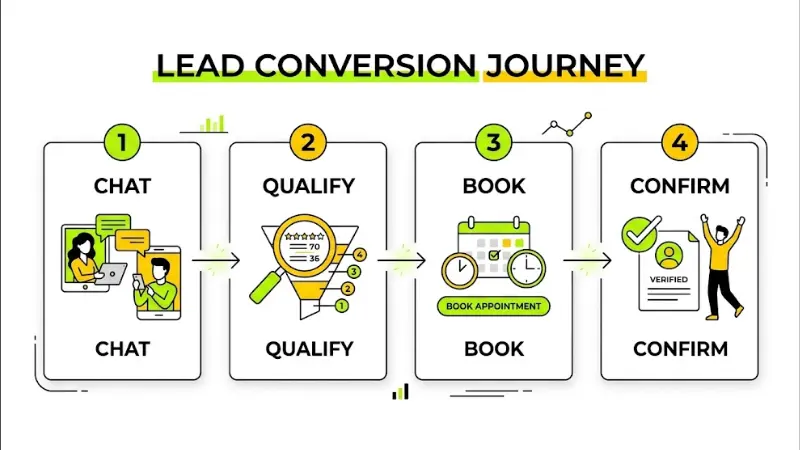
Losing leads after hours? Texas Brains can map your qualification questions, set your lead rules, and show you where a chatbot will save the most time. Start with a clear plan.
Illustrative example, not a client result: a service company connects website forms, CRM records and booked jobs into one dashboard. The owner sees which lead sources bring paying customers and which stall.
Can AI analyze data from many systems? Yes, if the data is connected and clean. Bad data produces bad insights.
Option | Best for | Strengths | Trade-offs |
|---|---|---|---|
Built-in CRM reports | Basic needs | Fast, included | Limited flexibility |
Power BI, Tableau or Looker Studio | Teams with data skills | Powerful charts, many connectors | Setup, licensing and learning curve |
No-code AI dashboard builders | Quick prototypes | Fast, lower upfront effort | Limits on security and custom logic |
Custom development | Unique workflows and integrations | Fits your process exactly | Higher project cost and ongoing support |
Check which CRM platforms support custom dashboards and API access before you commit.
I will not quote a single price, because projects vary a lot. Ask for a written scope and compare what each proposal includes. These factors change the cost:
Subscriptions often cost less at the start. Custom can pay off when you need specific workflows, more control or fewer tool limits. Compare total cost over time, not just the first invoice.
Should a startup build custom? Often not at first. Start with an existing CRM and add a simple dashboard. Consider custom once your process, data volume or integrations outgrow the basics.
Both can work. What matters is communication, experience and clear ownership. If you work in Washington or elsewhere in the U.S., ask about time zones, meeting schedules and response times.
Your dashboard can show which pages and sources bring leads. Track organic leads, and watch brand searches and direct visits, since AI search users often come back by name. Clear, well-structured pages help machines understand your business, but no one can guarantee AI recommendations.
Ready to connect your chatbot to your business systems? Texas Brains builds integrations for lead qualification, support, appointment booking, and CRM workflows. Please tell us your process, and we will map the connections.
Set a baseline first. Compare after 30 to 90 days.
A custom AI CRM dashboard turns scattered data into clear next steps. Start with the questions your team must answer, connect clean data, and build in stages. If you want a partner to plan and build it, Texas Brains can help. Explore our CRM and dashboard development services page.
Discuss your workflow, budget and integrations with Texas Brains
Contact us now at +14696706767 or texasbrainsllc@gmail.com and start your project with confidence.
This article is for information only. Tools, features, and costs vary. Verify details with vendors and seek advice on data privacy and security requirements before you build.
We help you grow your personal brand with a clear strategy, smart SEO, and marketing that brings real people, not just traffic.
AI can generate a draft layout and basic reports. Real business dashboards still need data connections, security checks, and testing. Use AI to speed up the work, then have skilled people review it.
It depends on scope, integrations and data quality. Simple dashboards can take weeks. Complex systems take longer. Ask for a milestone plan with testing and launch dates.
Often yes, through APIs and connectors. Your CRM must allow the access you need. Confirm permissions, data limits and available integrations before you start.
Yes, when the dashboard solves a real reporting problem. Start small with key metrics. Expand as your needs grow.
A CRM dashboard focuses on customers, leads and sales. A business intelligence dashboard can combine many data types across the company. Many businesses start with CRM and add broader BI later.
We will reply to you as soon as possible
Please enter your details, location, and select a suitable date and time slot.