
Texas Brains is a creative design and digital growth agency built for founders who don’t want just a logo” or just a website they want a brand that scales, converts, and dominates attention.

An AI chatbot can qualify leads and book appointments automatically when it connects to your calendar and CRM. It asks screening questions, checks open times and confirms the booking. It works best for clear, repeatable requests. It still needs rules, testing and a human backup for tricky cases. A chatbot that only answers questions is a toy. A chatbot that books qualified calls is a sales tool.
An AI chatbot is software that talks with people in plain language. It reads a question, understands the meaning and replies.
Is ChatGPT an AI chatbot? Yes, it is a general one. A business chatbot is set up for your services, your rules and your tools.
Feature | Rule-based chatbot | AI chatbot |
|---|---|---|
Replies | Fixed scripts | Flexible, language-based |
Handles odd questions | Poorly | Better, with limits |
Setup effort | Lower | Higher: needs testing and guardrails |
Best for | Simple menus and FAQs | Conversations, qualification, booking |
They ask the questions your sales team would ask, then sort the answers.
Can it spot high-intent visitors? It can flag signals, such as asking about pricing, timelines, or availability. You still decide the rules.
Losing leads after hours? Texas Brains can map your qualification questions, set your lead rules, and show you where a chatbot will save the most time. Start with a clear plan.
A chatbot books by connecting to your calendar.
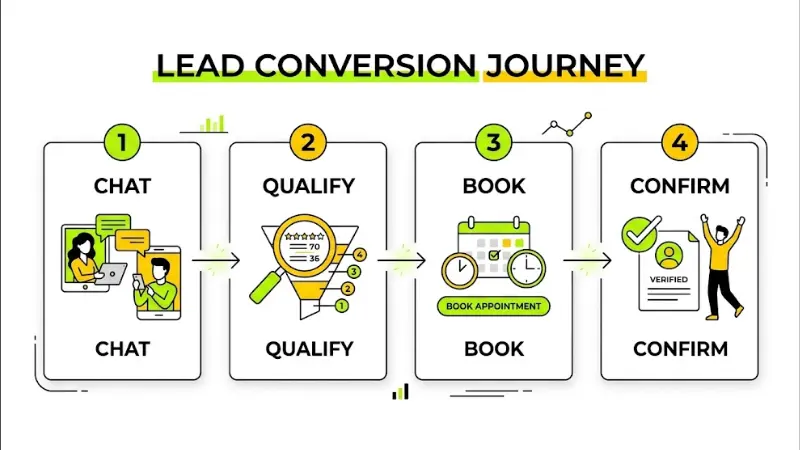
Visitor starts a chat → chatbot qualifies the lead → chatbot checks calendar availability → visitor picks a time → booking confirmed → CRM updated → team notified.
Can AI update records and trigger workflows on its own? Yes, with the right setup. Keep a human review step for important actions.
Imagine a home services company. A visitor asks for a bathroom remodel quote. The bot asks about location, project type, and timeline. It confirms the area is served. It offers three open times for a free consultation. The visitor picks one. The CRM gets the details, and the estimator gets an alert. This is a sample workflow, not a result claim.
If your service needs a long, custom discussion before booking, use the bot to gather details, not to close the deal.
Option | Best for | Strengths | Trade-offs |
|---|---|---|---|
Ready-made platform | Simple needs and smaller budgets | Quick start, lower setup cost | Limited customization, platform rules |
Custom chatbot | Unique workflows and strict requirements | Fits your process, flexible integrations | Higher cost, needs development and testing |
Free builders can work for basic use. Check their limits on data, branding, integrations and support before you rely on them for business leads.
Not sure whether a ready-made bot or a custom build fits your business? Texas Brains compares both against your workflow, tools and budget, then gives you a straight recommendation.
Cost depends on your setup, so I will not quote a number. Ask for a written scope. Price factors include integrations, custom logic, data security needs, testing and ongoing support.
Chatbots are helpful, not perfect. Privacy and chatbot rules can vary by state and industry. If you handle sensitive data, ask a qualified professional about your obligations. This is not legal advice. In Washington, check state and industry rules that apply to your business before you collect customer data.
Set a baseline first. Then compare after launch.
Traffic may look flat while leads grow. People often hear your name from AI, then search for you directly.
Connect one workflow, prove it works, then expand. Faster follow-up, cleaner data, and clearer reporting follow when your website, CRM, and AI tools work as one system. If you want help building it, Texas Brains can plan and implement it with you.
Book your AI integration consultation with Texas Brains
Contact us now at +14696706767 or texasbrainsllc@gmail.com and start your project with confidence.
This article is for information only. Software features, integrations and prices change often. Confirm details with each vendor and seek legal or compliance advice for data privacy needs.
We help you grow your personal brand with a clear strategy, smart SEO, and marketing that brings real people, not just traffic.
They can handle first-round qualification when you set clear rules. They ask questions, score answers and route leads. Humans should still review edge cases and high-value prospects.
Yes, when connected to your calendar. They can check live availability and confirm bookings at any hour. Test time zones, buffers and cancellations first.
Sometimes, for simple needs. Check limits on integrations, data control, branding and support. Growing businesses often outgrow free tiers.
Often yes, through native integrations, no-code tools or custom API work. Your CRM and calendar must offer compatible connections and permissions.
Hand off when the visitor is upset, the request is complex, the deal is high value or the bot is unsure. A clear handoff protects trust.
We will reply to you as soon as possible
Please enter your details, location, and select a suitable date and time slot.